News Blog
The official blog from the team at Google News
More points of view on Google News
Friday, October 28, 2011
By Jayakumar Hoskere, Software Engineer
When a big story breaks, there are often over a thousand articles written about the news event. At Google News, we work hard to surface the most relevant and interesting content to you -- so you can spend less time sorting through thousands of articles, and more time consuming news from a range of diverse perspectives. For instance, since introducing
expandable stories
, we have added additional labels to call out special types of articles in many editions. These labels are designed to highlight different content types on Google News, and show you stories that complement and expand upon standard news reporting. The four labels we recently launched include:
Live Updating
: A live-updating article, such as a liveblog.
Featured
: An article a publisher has told us is
standout
.
Fact-check
:
An article providing fact-check content about the story.
Your Preferred source
: An article from a source that you
preferred
.
Evaluating a story from different angles often provides a sharper perspective. That is why we also now highlight special types of articles in many Google News search results. Your search results will not only show recent articles, but also those from diverse perspectives that relate to a given query.
We also
recently added
the Translate button to non-English international stories in expandable story boxes in the U.S edition, giving you the ability to read pieces from all over the world -- even if you don’t speak the language.
We hope you find these changes useful as we continue to develop opportunities for you to find more interesting and valuable content.
News joins Google Dashboard
Friday, October 28, 2011
Posted by Panchapagesan Krishnamurthy, Software Engineer
Halloween is almost here and we're celebrating early. No trick -- just a treat. As of now, you can access Google News in the
Google Dashboard
. This gives you the ability to see basic information about your Google News personalizations, check out our privacy policy and click through to edit your preferences.
We're excited to bring you this additional level of control and encourage you to give it a whirl.
Bringing relevant news to you, regardless of language
Tuesday, October 25, 2011
Posted by Yaroslav Kurovtsev, Software Engineer, Google Translate
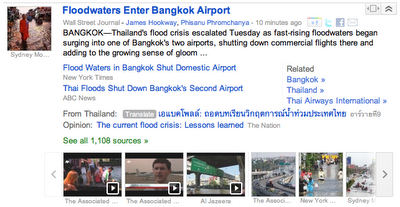
To help bridge language barriers between you and the news of interest to you from around the world -- and to bring you more diverse perspectives on foreign events -- we’ve added a new “translate” button to the expandable story boxes in the U.S. English edition of
Google News
. Clicking the translate button reveals the English translation of the original headline using
Google Translate
. Clicking on the headline takes you to the publisher’s website where you can choose to use Google Translate to see an English version of the entire article. Headlines are labeled with their country of origin. To do this, we look for foreign articles from local sources on a relevant news topic.
For example, in the case of the flood in Thailand, in addition to surfacing English articles from international press like New York Times, we might show a related article from a local source like อ
าร์วายที9.
At the same time, we hope readers will benefit from finding relevant news in other languages and being able to read it without knowing the language.
Google News launches redesign in UK and India
Thursday, September 29, 2011
Posted by Scott Zuccarino, Product Manager
Starting today, we’ll be rolling out changes to some international versions of Google News in an effort to unify the News experience across editions. As in the U.S. version, these changes offer richer visual navigation, help you find trending and popular news more easily, give you the option to further customize your news experience, and allow you to share pieces you care about in a simpler way.
We’ve also been working to give you a
closer relationship
with the publishers you love, who can now highlight some of their most compelling content right on your Google News homepage.
In order to bring you the best Google News experience possible, we’ll be periodically refreshing select editions, starting with the U.K. and India. We hope you enjoy these enhancements. As always, please feel free to submit your
feedback
or visit our
Help Center
if you have more questions.
Recognizing publishers’ standout content in Google News
Saturday, September 24, 2011
Posted by David Smydra, Product Specialist and Justin Kosslyn, Product Manager
Every day, news organizations and journalists around the world dedicate significant time and resources toward some of the most critical types of coverage: exceptional original reporting, deep investigative work, scoops and exclusives, and various special projects that quite clearly stand out. Today, during a Google News workshop at the
Online News Association conference
in Boston, we introduced a new content tag for the US edition that will help us better feature this “standout” content and give even more credit where credit is due.
If you put the tag in the HTML header of one of your articles, Google News may show the article with a ‘Featured’ label on the Google News homepage and News Search results. The syntax for this new tag is as follows:
<link rel="standout" href=“http://www.example.com/scoop_article_2.html” />
You can use the tag to point to your own content or to point to other sources with standout stories. Because the Standout tag belongs in the HTML header of your articles, it will only be seen by automated systems like Google News, not by direct readers of your articles themselves.
Standout Content tags work best when news publishers recognize not just their own quality content, but also the original journalistic contributions of others when your stories draw from the standout efforts of other publications. Linking out to other sites is well recognized as a best practice on the web, and we believe that citing others’ standout content is important for earning trust as you also promote your own standout work.
At this point, we ask news organizations to use the Standout tag to cite their own content at most seven times in each calendar week. If a site exceeds that limit, it may find that its tags are less recognized, or ignored altogether. A news organization may cite standout stories from other news sources any number of times each week.
To be clear, Standout tags are just one signal among the many signals that algorithmically determine prominence on Google News. We recognize the importance of giving credit where credit is due, and believe this tag can be a step in the right direction -- but it will only succeed if the publisher community helps it succeed. We have experimented in the past with
other metatags
, and have applied feedback from those efforts to this initiative. As we monitor how the Standout tag is applied, we'll look forward to sharing further observations or updates.
To learn more about how the Standout tag works and how you can implement it on your site, visit our
Help Center article
.
Google News now crawling with Googlebot
Thursday, August 25, 2011
Posted by David Smydra, Google News Product Specialist
(Cross-posted on the
Webmaster Central Blog
)
Google News recently updated our infrastructure to crawl with Google’s primary user-agent,
Googlebot
. What does this mean? Very little to most publishers. Any news organizations that wish to opt out of Google News can continue to do so: Google News will still respect the robots.txt entry for
Googlebot-News
, our former user-agent, if it is more restrictive than the robots.txt entry for Googlebot.
Our Help Center provides detailed
guidance
on using the robots exclusion protocol for Google News, and publishers can contact the Google News Support Team if they have any questions, but we wanted to first clarify the following:
Although you’ll now only see the Googlebot user-agent in your site’s logs, no need to worry: the appearance of Googlebot instead of Googlebot-News is independent of our inclusion policies. (You can always check whether your site is included in Google News by searching with the “site:” operator. For instance, enter “site:yournewssite.com” in the search field for Google News, and if you see results then we are currently indexing your news site.)
Your analytics tool will still be able to differentiate user traffic coming to your website from Google Search and traffic coming from Google News, so you should see no changes there. The main difference is that you will no longer see occasional automated visits to your site from the Googlebot-news crawler.
If you’re currently respecting
webmaster guidelines for Googlebot
, you will not need to make any code changes to your site. Sites that have implemented subscriptions using a metered model or who have implemented First Click Free will not experience any changes. For sites which require registration, payment or login prior to reading any full article, Google News will only be able to crawl and index the title and snippet that you show all users who visit your page. Our Webmaster Guidelines provide additional information about “
cloaking
” (i.e., showing a bot a different version than what users experience). Learn more about Google News and subscription publishers in this
Help Center article
.
Rest assured, your Sitemap will still be crawled. This change does not affect how we crawl News Sitemaps. If you are a News publisher who hasn’t yet set up a News Sitemap and are interested in getting started, please follow
this link
.
For any publishers that wish to opt out of Google News and stay in Google Search, you can simply disallow Googlebot-news and allow Googlebot. For more information on how to do this, consult our
Help Center
.
As with any website, from time to time we need to make updates to our infrastructure. At the same time, we want to continue to provide as much control as possible to news web sites. We hope we have answered any questions you might have about this update. If you have additional questions, please check out our
Help Center
.
Enhancements to Google News for Android tablets and iPads
Tuesday, August 9, 2011
Posted by Arun Prasath, Tech Lead, Mobile Google News
Alongside working on improving the Google News
design for smartphones
, we have also been looking into enhancing our offering for tablet devices. Today, we are launching a few minor enhancements to Google News for Android tablets and iPads.
We have optimized columns in the home page and section pages so that they can be more easily viewed in portrait and landscape orientations. Some of the other updates include: a conveniently placed menu on the top for navigating across sections, support of finger swiping through the multimedia strip in expanded story boxes and a more friendly edition picker.
These improvements are now available in the U.S. edition. To view these changes, just type
news.google.com
on the browser of your favorite tablet.
Google News highlights unique content with Editors’ Picks
Thursday, August 4, 2011
(Cross-posted on the
Official Google Blog
)
News organizations tell stories online in ways that bring together the best of traditional and digital journalism, whether that involves long-form investigative features, compelling photo slideshows or interactive maps and charts that add new levels of engagement to the day's news. To help connect you to the best works of news publishers, Google News is introducing a new section in the right-hand column of the U.S. edition. The section is called "Editors' Picks,” and it displays original content that publishers have selected as highlights from their publications. This is the latest addition to
recent improvements
we’ve made to the variety and presence of stories and multimedia on Google News.
An array of news organizations, including local, national and niche publishers, are now using Editors’ Picks to display their best, most engaging content. Because Google News relies on algorithms, Editors' Picks will always be just that—picks provided by publishers themselves, and not by Google. You can browse a set of publisher feeds that span national, specific and local interests—like The Atlantic, The Wall Street Journal, ProPublica, the Guardian and The Root, among many others—via the side-to-side arrows next to each publisher's logo. The feeds you see are chosen based on a variety of factors, including your
news preferences
. If you’re interested in using source preferences on Google News, Editors' Picks helps you do that with the slider that appears just below the articles.
You may have first noticed Editors’ Picks
as an experiment last year
. Based on the data from that experiment, we have been working with nearly two dozen publishers in recent months and have seen a positive response from readers and publishers alike: readers get the news they're interested in from the sources they trust, and publishers receive higher traffic to their websites. We encourage any news organizations that are interested to visit our
Help Center
to get started.
Posted by Yogita Mehta, Software Engineer, Google News Team
A Few Google News Design Changes
Thursday, July 21, 2011
Posted by Jasson Schrock, User Experience Designer
Beginning today in the U.S. English edition of News, you may notice a few changes in the look and feel. This is part of a
Google-wide initiative
to improve your experience, and today we’re happy to extend this to Google News.
For starters, we’ve cleaned up the Google News homepage a bit. With fewer visual distractions and less clutter on the page, it should be faster to find the news important to you. The editions menu and “Personalize” button at the top should be easier to see. The “Personalize” button links to your
recently consolidated personalization settings
including your preferences for topics and favorite sources. Throughout the site, all the features and functionality are still there, but this updated design is aligned with the new consistent look across other recently updated Google sites like
Gmail
,
Maps
and
Search
.
Before
After
In the coming months, you’ll continue to see more improvements to the layout and design of the site, and we’ll also expand internationally.
Shareable Google News badges for your favorite topics
Thursday, July 14, 2011
Posted by Natasha Mohanty, Engineer, Google News
(Cross-posted on the
Official Google Blog
)
On Google News, the average reader of political news has read 20 articles about politics in the last six months. Where do you stand?
Starting today, in the U.S. edition of
Google News
, you can see how voracious a news reader you are by earning Google News badges as you read articles about your favorite topics. The more you read, the higher level badge you’ll receive, starting with Bronze, then moving up the ladder to Silver, Gold, Platinum and finally, Ultimate.
We have more than 500 badges available, so no matter what kind of news you’re into, there’s a badge out there for you. Here’s a taste:
Your badges are private by default, but if you want, you can share your badges with your friends. Tell them about your news interests, display your expertise, start a conversation or just plain brag about how well-read you are. You can also add custom sections by hovering on a badge and clicking “add section” to read more about your favorite topics. To get started with badges, visit Google News from a signed-in account with
web history
enabled and then visit this page on our
Help Center
for instructions.
This is just the first step—the bronze release, if you will—of Google News badges. Once we see how badges are used and shared, we look forward to taking this feature to the next level.
In the spirit of continually trying to improve Google News, we have heard loud and clear from the many of you who asked us to separate our Sci/Tech section into two distinct sections. We are happy to report that we have now done this for all English editions, with more languages coming soon. We also combined some personalization settings from the “News for you” and News Settings menu into one handy sidebar at the top right corner of the home page, so you can easily tell us what you want to read on your Google News.
We hope you’ll badge up on Google News to keep track of what you’re reading, read more of what you love and share your passions with your friends.
Labels
announcements
30
currently in the news
13
features
43
Google News Blog
153
help for publishers
21
languages and editions
13
looking backward
7
Archive
2016
Sep
May
Apr
2015
Aug
2014
Aug
Feb
2013
Dec
Jun
Mar
2012
Dec
Oct
Sep
May
Mar
Jan
2011
Nov
Oct
Sep
Aug
Jul
Jun
May
Apr
Feb
2010
Nov
Oct
Sep
Aug
Jul
Jun
May
Apr
Feb
Jan
2009
Dec
Nov
Sep
Aug
Jul
Jun
May
Apr
Mar
Feb
Jan
2008
Nov
Oct
Sep
Aug
Jun
May
Apr
Mar
Feb
Jan
2007
Dec
Nov
Oct
Sep
Aug
Jul
Jun
Feed
Google
on
Follow @google
Follow
Give us feedback in our
Product Forums
.





 Follow